

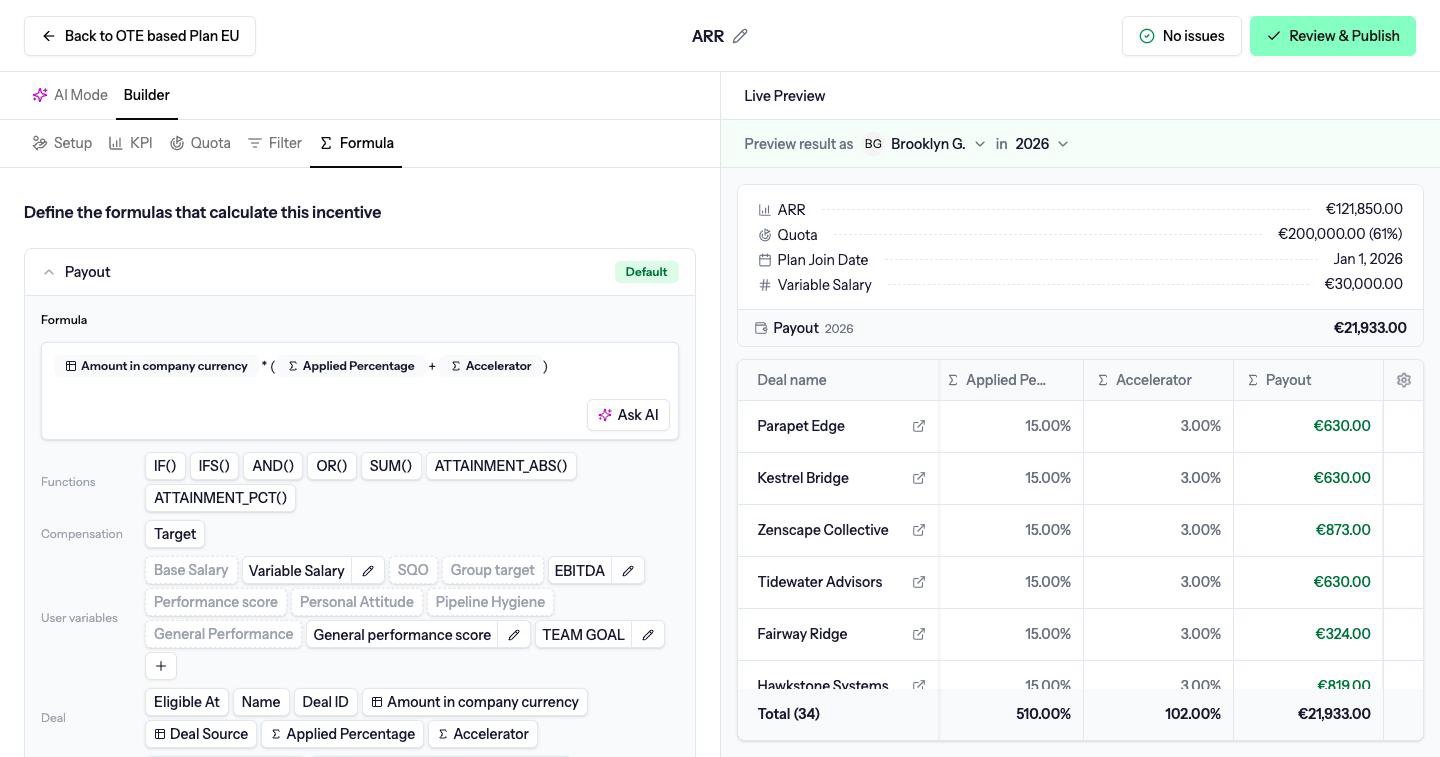
The payout formula
Every compensation has one formula named Payout, marked Default. This is the earning. You can edit it. You cannot delete it, and you cannot add a second earning formula.Display formulas
Add formula creates a display formula, named New formula until you rename it. A display formula calculates a figure people should see, such as attainment or the rate that applied. It does not add a second payment on top of Payout. Each display formula has a Name and a Format: Currency, Percentage or Number. Renaming a formula updates other formulas that refer to it. The trash icon deletes a display formula.What you can insert
Under the editor, chips are grouped:
A ghost chip on User variables is a variable that does not yet have a value for every person on the plan. Click it to fill the values in before you insert it.
Spreadsheet functions
Any built-in spreadsheet function works, not only the chips. The reference list is the HyperFormula list of available functions. The functions you will use most often: Logic
Math and rounding
Attainment functions
ATTAINMENT_PCT and ATTAINMENT_ABS are Driven functions. They are not in the spreadsheet list. Both need quotas to be on. Without a quota, ATTAINMENT_PCT() is zero.
ATTAINMENT_PCT() is performance divided by the period quota, as a ratio. 1 is 100%. 0.8 is 80%. 1.2 is 120%. Compare it with 1, not with 100.
ATTAINMENT_ABS() is the KPI value itself. In a row-based compensation it is the running KPI up to and including the current deal, which is what you want for an accelerator that changes rate as the person crosses quota mid-period.
Do not rebuild attainment by dividing a column total by Target. The attainment functions already handle the quota window for people who joined mid-period.
Another compensation’s attainment
ATTAINMENT_PCT() with nothing inside is this compensation’s own attainment.
A formula can use another compensation’s attainment for the same person and the same payout period. Pass that compensation to ATTAINMENT_PCT. In a row-based formula, every deal receives the same number. Deals are not matched one to one with the other compensation.
This works when all of the following are true:
- The other compensation is published, on this plan, and has quotas on.
- Both compensations use the same KPI period and the same payout frequency.
- That KPI period and payout frequency are the same as each other. A monthly KPI paid monthly can reference another one like it. A monthly KPI paid quarterly cannot reference attainment this way.
ATTAINMENT_PCT() for its own attainment.
Example. A bonus compensation, paid on the same schedule as New business, pays 10% of its own quota only when New business attainment is at least 100%. The test is that compensation’s attainment against 1. Below 100% the bonus pays nothing.
Examples
ReplaceAmount with the deal amount chip. These examples are row-based. For a totals compensation, use Target or a Total chip in place of Amount.
Tiered accelerator. 5% until quota, 8% from quota, 12% from 120% of quota. IFS stops at the first test that passes, so write the highest tier first.
Extra columns
Extra columns are additional deal fields shown in the calculation table, such as stage or owner. Add them from the Columns menu on the preview. The KPI’s deal property is added for you when you pick it. Each extra column is Default or Cumulative. Default shows the deal’s own value. Cumulative shows a running total down the list. For running quota progress, preferATTAINMENT_ABS() over a cumulative column.
A Total chip is added for each extra column, named Total: followed by the column name. Renaming the column does not break formulas that use its total.