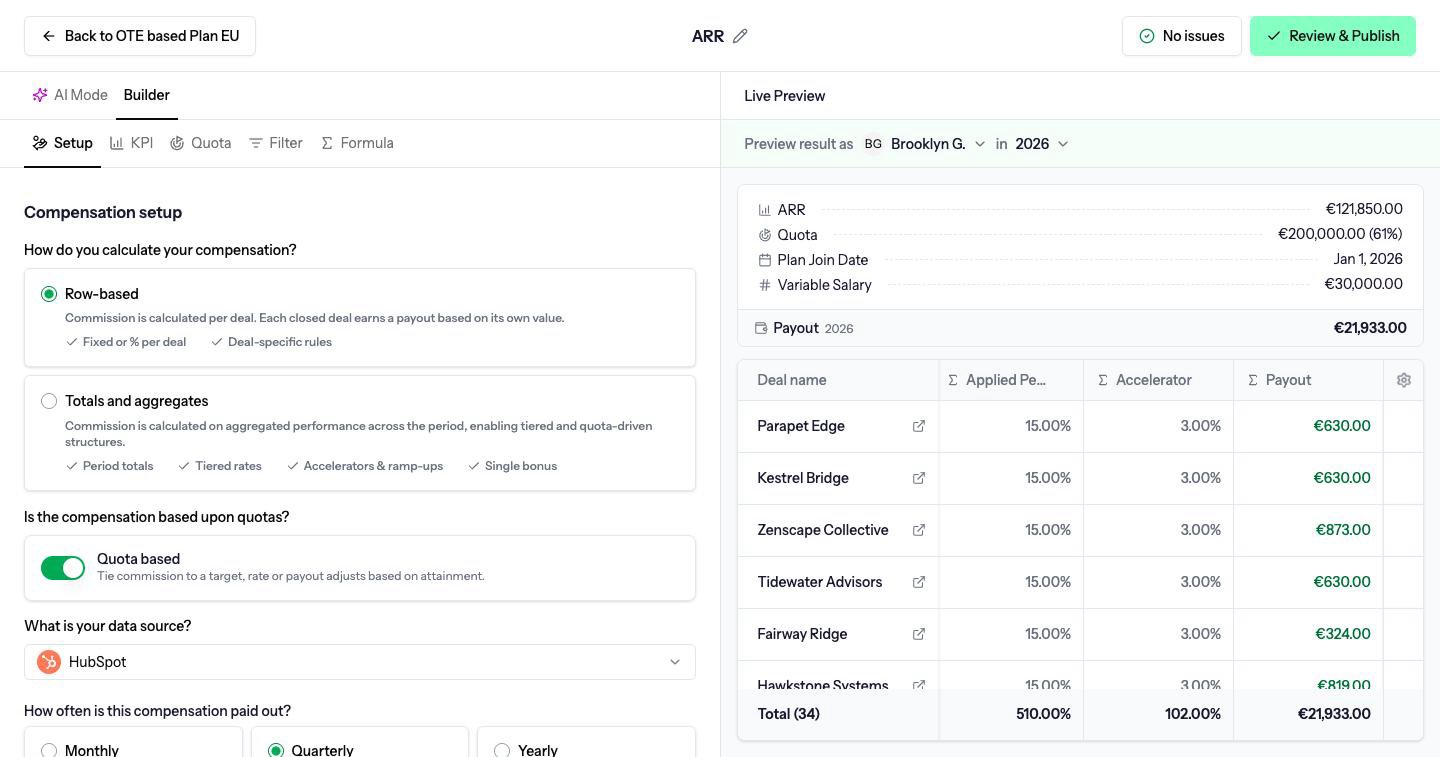
A compensation plan holds one or more compensations. The builder is where you set the KPI, quota, filter and formula.
A compensation plan is the container for one team’s commission rules. It has a currency and a timezone. Periods, quotas and payouts for that plan all use that timezone, and the company’s fiscal year.A compensation is one commission component inside the plan: one KPI, and the formula that turns performance into money. A plan usually has several. New business and renewals are two compensations, not two plans, when the same people are paid on both.Open a plan from Plan designer, then open a compensation to reach the builder. AI Mode and Builder sit at the top. The header has Back to the plan, an issues indicator and Review & Publish. Live Preview stays on the right on every tab.
Live Preview calculates the compensation for one person and one period, using current data. Preview result as is where you pick the person and the period. Inside those menus the lists are labeled Plan members and Periods. The deal table and the breakdown update as you edit.Use the preview before you publish. It is the same calculation the payout will use while the payout is still a draft.
Save as draft keeps the compensation unpublished. Drafts are not used in payouts. This button is only there while the compensation is not published yet.
Review & Publish checks the compensation and publishes it. Published compensations are what draft payouts calculate from.
If you leave with unsaved edits, Driven asks you to Stay or Leave.Publishing a change that would alter payouts already approved or paid does not rewrite those payouts. Driven opens a review of the difference first. See Corrections.
Calculation methods
Pay per deal, or pay on the period total.
KPIs
The metric a compensation measures.
Formulas
Turn performance into a payout.
Quotas
Plan-wide, individual and roll-up quotas.
Row-based and totals
Row-based compensations pay per deal. Totals and aggregates pay on the whole period, which is how tiers and accelerators work.
KPIs
A KPI is the metric a compensation measures, such as closed revenue or number of deals, taken from your CRM and filtered to the deals that count.
Manual KPIs
A manual KPI is a metric you type in yourself, one value per period, shared across the company instead of read from the CRM.
User variables
User variables are per-person amounts in a formula, such as Base Salary and Variable Salary, each with a history of effective dates.
Quotas
A quota is the performance a compensation expects for one period. It can be the same for everyone, set per person, or rolled up to a manager.
Formulas
The payout formula turns KPI performance into money. Display formulas add extra figures. Both accept spreadsheet functions plus Driven attainment functions.
Payout period and compensation period
How often you pay can differ from the period the KPI and quota cover. Driven treats that as an equal, deferred or advance payout.
Corrections
A correction is the difference between what a locked payout paid and what the current rules say it should have paid. You choose whether to add it to the next payout or write it off.
Last modified on October 27, 2026
{"docsConfig":{"theme":"mint","$schema":"https://mintlify.com/docs.json","name":"Driven Knowledge Base","description":"Help center for Driven, the sales-compensation platform that calculates commissions from CRM opportunities using configurable compensation plans.","colors":{"primary":"#01ab56","light":"#87ffbb","dark":"#87ffbb"},"logo":{"light":"https://mintcdn.com/driven-a7b16d8c/EfofHHnWRF2nRMlf/logo/driven-logo-light-mode.svg?fit=max\u0026auto=format\u0026n=EfofHHnWRF2nRMlf\u0026q=85\u0026s=0ac5d6e629183e91ed93a8862e01eadf","dark":"https://mintcdn.com/driven-a7b16d8c/EfofHHnWRF2nRMlf/logo/driven-logo-dark-mode.svg?fit=max\u0026auto=format\u0026n=EfofHHnWRF2nRMlf\u0026q=85\u0026s=fadf4e2af9903bf7cfa7e6623cad99b6","href":"https://www.driven.work/?utm_source=docs\u0026utm_medium=logo\u0026utm_campaign=knowledge-base"},"favicon":"https://mintcdn.com/driven-a7b16d8c/EfofHHnWRF2nRMlf/favicon.ico?fit=max\u0026auto=format\u0026n=EfofHHnWRF2nRMlf\u0026q=85\u0026s=7bc256bb880acd1b10f0dc264368ba36","appearance":{"default":"system"},"background":{"color":{"light":"#ffffff","dark":"#191932"}},"navbar":{"links":[{"href":"https://app.driven.work/sign-up?utm_source=docs\u0026utm_medium=navbar\u0026utm_campaign=knowledge-base\u0026utm_content=start-free","label":"Start free"}],"primary":{"type":"button","label":"Book a demo","href":"https://www.driven.work/request-a-demo?utm_source=docs\u0026utm_medium=navbar\u0026utm_campaign=knowledge-base\u0026utm_content=book-a-demo"}},"search":{"prompt":"Search the Driven knowledge base..."},"seo":{"metatags":{"canonical":"https://docs.driven.work","og:site_name":"Driven Knowledge Base"},"organization":{"name":"Driven","legalName":"Driven Tech BV","url":"https://www.driven.work"},"indexing":"navigable"},"contextual":{"options":["copy","view","chatgpt","claude","perplexity","mcp","cursor","vscode"],"display":"header"},"metadata":{"timestamp":true},"markdown":{"instructions":"Driven is a sales-compensation platform. Use its terminology: Compensation Plan, Compensation, KPI, Manual KPI, User Variable, Quota, Performance, Payout (Draft, Approved, Paid, Cancelled), Correction, Adjustment. Payout types are equal, deferred and advance. Default roles are Admin and Employee; companies can add custom roles. The Driven Agent builds plans from uploaded documents and chat. The Compensation Builder is where compensations are configured."},"styling":{"latex":false},"navigation":{"directory":"card","pages":[]}},"deployment":{"deploymentMetadataValue":{"subdomain":"driven-a7b16d8c","hasAudioNarration":false,"actualSubdomain":"driven-a7b16d8c","customDomains":["docs.driven.work"],"gitSource":{"type":"github","owner":"driven-hq","repo":"driven","deployBranch":"main","contentDirectory":"knowledge-base","isPrivate":true,"mountPath":"","label":"","_id":"6ae0c6bb64ae4738365b1faa"},"chroma":{"latestBuiltDeploymentHistoryId":"6ae0c6fe64ae4738365b2625","collectionId":"5066800e-62ec-40c1-9cfb-0c2cde6a453b","liveDeploymentHistoryId":"6ae0c6fe64ae4738365b2625","schemaVersion":"v3"},"entitlements":{"AI_CHAT":{"status":"ENABLED"},"WEB_MCP":{"status":"ENABLED"},"NARRATION":{"status":"ENABLED"}},"buildId":"6ae0c85e64ae4738365b56cd","clientVersion":"0.0.3971","searchFilterCounts":[{"language":"default","tag":"Admins","count":25},{"language":"default","tag":"Compensation Builder","count":8},{"language":"default","tag":"Integrations","count":5},{"language":"default","tag":"Users","count":5},{"language":"default","tag":"Commission carriers","count":4},{"language":"default","tag":"Your plan and payouts","count":4},{"language":"default","tag":"Payouts","count":4},{"language":"default","tag":"Get started","count":2},{"language":"default","tag":"Driven Agent","count":1}]},"assistantConfig":{"enableAskAiButton":false,"enableStarterQuestions":false,"enableContextualStarterQuestions":false,"enableAskAiSearchBar":true},"basePath":"","hasChatPermissions":true,"hasWebMcpPermissions":true,"toggles":[{"name":"kill-isr","enabled":true,"variant":{"name":"disabled","enabled":false,"feature_enabled":true},"impressionData":false},{"name":"agent-mintlify-slack","enabled":true,"variant":{"name":"disabled","enabled":false,"feature_enabled":true},"impressionData":false},{"name":"editor-v7-file-tree","enabled":true,"variant":{"name":"disabled","enabled":false,"feature_enabled":true},"impressionData":false},{"name":"agent-integrations-settings","enabled":true,"variant":{"name":"disabled","enabled":false,"feature_enabled":true},"impressionData":false},{"name":"automations-pr-grouping","enabled":true,"variant":{"name":"disabled","enabled":false,"feature_enabled":true},"impressionData":false},{"name":"custom-prefix","enabled":true,"variant":{"name":"disabled","enabled":false,"feature_enabled":true},"impressionData":false},{"name":"analytics-v7","enabled":true,"variant":{"name":"disabled","enabled":false,"feature_enabled":true},"impressionData":false},{"name":"user-flows-analytics","enabled":true,"variant":{"name":"disabled","enabled":false,"feature_enabled":true},"impressionData":false},{"name":"no-publish-flow","enabled":true,"variant":{"name":"disabled","enabled":false,"feature_enabled":true},"impressionData":false},{"name":"workos-onboarding","enabled":true,"variant":{"name":"disabled","enabled":false,"feature_enabled":true},"impressionData":false},{"name":"llms-txt-v2","enabled":true,"variant":{"name":"disabled","enabled":false,"feature_enabled":true},"impressionData":false},{"name":"pause-universal-search-reconcile","enabled":true,"variant":{"name":"disabled","enabled":false,"feature_enabled":true},"impressionData":false},{"name":"snapshot-serving-live","enabled":true,"variant":{"name":"disabled","enabled":false,"feature_enabled":true},"impressionData":false},{"name":"stripTemperatureMiddleware","enabled":true,"variant":{"name":"disabled","enabled":false,"feature_enabled":true},"impressionData":false},{"name":"per-site-search-delta","enabled":true,"variant":{"name":"disabled","enabled":false,"feature_enabled":true},"impressionData":false},{"name":"support-platform-pylon-zendesk","enabled":true,"variant":{"name":"disabled","enabled":false,"feature_enabled":true},"impressionData":false},{"name":"snapshot-serving","enabled":true,"variant":{"name":"disabled","enabled":false,"feature_enabled":true},"impressionData":false},{"name":"instant-rollback","enabled":true,"variant":{"name":"disabled","enabled":false,"feature_enabled":true},"impressionData":false},{"name":"granular-notifications-server","enabled":true,"variant":{"name":"disabled","enabled":false,"feature_enabled":true},"impressionData":false},{"name":"granular-notifications","enabled":true,"variant":{"name":"disabled","enabled":false,"feature_enabled":true},"impressionData":false},{"name":"editor-private-page-search","enabled":true,"variant":{"name":"disabled","enabled":false,"feature_enabled":true},"impressionData":false},{"name":"automations-fable","enabled":true,"variant":{"name":"disabled","enabled":false,"feature_enabled":true},"impressionData":false},{"name":"fixed-ai-action-pricing","enabled":true,"variant":{"name":"disabled","enabled":false,"feature_enabled":true},"impressionData":false},{"name":"automation-resolve-merge-conflict","enabled":true,"variant":{"name":"disabled","enabled":false,"feature_enabled":true},"impressionData":false},{"name":"scoped-publishing","enabled":true,"variant":{"name":"disabled","enabled":false,"feature_enabled":true},"impressionData":false},{"name":"mintql","enabled":true,"variant":{"name":"disabled","enabled":false,"feature_enabled":true},"impressionData":false},{"name":"page-level-analytics","enabled":true,"variant":{"name":"disabled","enabled":false,"feature_enabled":true},"impressionData":false},{"name":"editor-version-history-v2","enabled":true,"variant":{"name":"disabled","enabled":false,"feature_enabled":true},"impressionData":false},{"name":"editor-nav-generations","enabled":true,"variant":{"name":"disabled","enabled":false,"feature_enabled":true},"impressionData":false},{"name":"billing-page-v2","enabled":true,"variant":{"name":"disabled","enabled":false,"feature_enabled":true},"impressionData":false},{"name":"workspace-projects","enabled":true,"variant":{"name":"disabled","enabled":false,"feature_enabled":true},"impressionData":false},{"name":"assistant-v5","enabled":true,"variant":{"name":"disabled","enabled":false,"feature_enabled":true},"impressionData":false},{"name":"byok-sep-25","enabled":true,"variant":{"name":"disabled","enabled":false,"feature_enabled":true},"impressionData":false},{"name":"fork-pr-previews","enabled":true,"variant":{"name":"disabled","enabled":false,"feature_enabled":true},"impressionData":false},{"name":"revalidation-jwt","enabled":true,"variant":{"name":"disabled","enabled":false,"feature_enabled":true},"impressionData":false},{"name":"vite-origin","enabled":true,"variant":{"name":"disabled","enabled":false,"feature_enabled":true},"impressionData":false},{"name":"editor-agent-model-picker","enabled":true,"variant":{"name":"disabled","enabled":false,"feature_enabled":true},"impressionData":false},{"name":"billing-updated-9-15","enabled":true,"variant":{"name":"disabled","enabled":false,"feature_enabled":true},"impressionData":false},{"name":"workos-sso-scim","enabled":true,"variant":{"name":"disabled","enabled":false,"feature_enabled":true},"impressionData":false},{"name":"hobby-abuse-scan","enabled":true,"variant":{"name":"disabled","enabled":false,"feature_enabled":true},"impressionData":false},{"name":"dashboard-inbox","enabled":true,"variant":{"name":"disabled","enabled":false,"feature_enabled":true},"impressionData":false},{"name":"workos-signup","enabled":true,"variant":{"name":"disabled","enabled":false,"feature_enabled":true},"impressionData":false},{"name":"workos-enabled","enabled":true,"variant":{"name":"disabled","enabled":false,"feature_enabled":true},"impressionData":false}],"isAtlas":false,"googleFontsInlined":false},"customCss":[{"filePath":"style.css","content":"a.group[href*=request-a-demo] .text-white,a.group[href*=request-a-demo] svg{color:#191932}"}],"page":{"pagePath":"compensation-builder","slug":"/compensation-builder","pageMetadata":{"title":"Compensation Builder","description":"A compensation plan holds one or more compensations. The builder is where you set the KPI, quota, filter and formula.","icon":"calculator","href":"/compensation-builder/index"},"description":{"compiledSource":"\"use strict\";\nconst {jsx: _jsx} = arguments[0];\nconst {useMDXComponents: _provideComponents} = arguments[0];\nfunction _createMdxContent(props) {\n const _components = {\n p: \"p\",\n ..._provideComponents(),\n ...props.components\n };\n return _jsx(_components.p, {\n children: \"A compensation plan holds one or more compensations. The builder is where you set the KPI, quota, filter and formula.\"\n });\n}\nfunction MDXContent(props = {}) {\n const {wrapper: MDXLayout} = {\n ..._provideComponents(),\n ...props.components\n };\n return MDXLayout ? _jsx(MDXLayout, {\n ...props,\n children: _jsx(_createMdxContent, {\n ...props\n })\n }) : _createMdxContent(props);\n}\nreturn {\n default: MDXContent\n};\n","frontmatter":{},"scope":{}},"pageType":"default","mdx":{"mdxSource":{"compiledSource":"\"use strict\";const{Fragment:_Fragment,jsx:_jsx,jsxs:_jsxs}=arguments[0];const{useMDXComponents:_provideComponents}=arguments[0];function _createMdxContent(props){const _components={a:`a`,li:`li`,p:`p`,strong:`strong`,tbody:`tbody`,td:`td`,th:`th`,thead:`thead`,tr:`tr`,ul:`ul`,..._provideComponents(),...props.components},{Card,CardGroup,Frame,Heading,OptimizedImage,Table}=_components;if(!Card)_missingMdxReference(`Card`,true);if(!CardGroup)_missingMdxReference(`CardGroup`,true);if(!Frame)_missingMdxReference(`Frame`,true);if(!Heading)_missingMdxReference(`Heading`,true);if(!OptimizedImage)_missingMdxReference(`OptimizedImage`,true);if(!Table)_missingMdxReference(`Table`,true);return _jsxs(_Fragment,{children:[_jsxs(_components.p,{children:[`A `,_jsx(_components.strong,{children:`compensation plan`}),` is the container for one team’s commission rules. It has a currency and a timezone. Periods, quotas and payouts for that plan all use that timezone, and the company’s fiscal year.`]}),`\n`,_jsxs(_components.p,{children:[`A `,_jsx(_components.strong,{children:`compensation`}),` is one commission component inside the plan: one KPI, and the formula that turns performance into money. A plan usually has several. New business and renewals are two compensations, not two plans, when the same people are paid on both.`]}),`\n`,_jsxs(_components.p,{children:[`Open a plan from `,_jsx(_components.strong,{children:`Plan designer`}),`, then open a compensation to reach the builder. `,_jsx(_components.strong,{children:`AI Mode`}),` and `,_jsx(_components.strong,{children:`Builder`}),` sit at the top. The header has `,_jsx(_components.strong,{children:`Back to`}),` the plan, an issues indicator and `,_jsx(_components.strong,{children:`Review \u0026 Publish`}),`. `,_jsx(_components.strong,{children:`Live Preview`}),` stays on the right on every tab.`]}),`\n`,_jsx(Frame,{children:_jsx(OptimizedImage,{src:`https://mintcdn.com/driven-a7b16d8c/EfofHHnWRF2nRMlf/images/builder-setup.png?fit=max\u0026auto=format\u0026n=EfofHHnWRF2nRMlf\u0026q=85\u0026s=54020c9aebd07bcfc47cbee3d6d7478a`,alt:`Compensation Builder on Setup, with Row-based selected, Quota based on, and Live Preview`,\"data-og-width\":`1440`,width:`1440`,\"data-og-height\":`757`,height:`757`,\"data-path\":`images/builder-setup.png`,\"data-optimize\":`true`,\"data-opv\":`3`,srcset:`https://mintcdn.com/driven-a7b16d8c/EfofHHnWRF2nRMlf/images/builder-setup.png?w=280\u0026fit=max\u0026auto=format\u0026n=EfofHHnWRF2nRMlf\u0026q=85\u0026s=179ecb8ef087562c4e1fa5b11535027d 280w, https://mintcdn.com/driven-a7b16d8c/EfofHHnWRF2nRMlf/images/builder-setup.png?w=560\u0026fit=max\u0026auto=format\u0026n=EfofHHnWRF2nRMlf\u0026q=85\u0026s=ad9bfbf2fc3d5ed8d6259eb6fa0c2dc2 560w, https://mintcdn.com/driven-a7b16d8c/EfofHHnWRF2nRMlf/images/builder-setup.png?w=840\u0026fit=max\u0026auto=format\u0026n=EfofHHnWRF2nRMlf\u0026q=85\u0026s=08f4b36df69a4173fefda06fa5f76331 840w, https://mintcdn.com/driven-a7b16d8c/EfofHHnWRF2nRMlf/images/builder-setup.png?w=1100\u0026fit=max\u0026auto=format\u0026n=EfofHHnWRF2nRMlf\u0026q=85\u0026s=82153bbd2e3d5727d235ecb19493547d 1100w, https://mintcdn.com/driven-a7b16d8c/EfofHHnWRF2nRMlf/images/builder-setup.png?w=1650\u0026fit=max\u0026auto=format\u0026n=EfofHHnWRF2nRMlf\u0026q=85\u0026s=4d2507b78a8a152eb1e0e913a5452bf3 1650w, https://mintcdn.com/driven-a7b16d8c/EfofHHnWRF2nRMlf/images/builder-setup.png?w=2500\u0026fit=max\u0026auto=format\u0026n=EfofHHnWRF2nRMlf\u0026q=85\u0026s=86179dd2dd35859aa3e9bce82fadf105 2500w`})}),`\n`,_jsx(Heading,{level:`2`,id:`tabs`,children:`Tabs`}),`\n`,_jsxs(Table,{children:[_jsx(_components.thead,{children:_jsxs(_components.tr,{children:[_jsx(_components.th,{children:`Tab`}),_jsx(_components.th,{children:`What you set`})]})}),_jsxs(_components.tbody,{children:[_jsxs(_components.tr,{children:[_jsx(_components.td,{children:_jsx(_components.strong,{children:`Setup`})}),_jsxs(_components.td,{children:[`A name, `,_jsx(_components.a,{href:`/compensation-builder/calculation-methods`,children:`how commission is calculated`}),`, how often it is paid, and whether it uses `,_jsx(_components.a,{href:`/compensation-builder/quotas`,children:`quotas`})]})]}),_jsxs(_components.tr,{children:[_jsx(_components.td,{children:_jsx(_components.strong,{children:`KPI`})}),_jsxs(_components.td,{children:[`The `,_jsx(_components.a,{href:`/compensation-builder/kpis`,children:`metric`}),` this compensation pays on, and the period that metric is measured over`]})]}),_jsxs(_components.tr,{children:[_jsx(_components.td,{children:_jsx(_components.strong,{children:`Quota`})}),_jsxs(_components.td,{children:[`Quota values. Shown only when `,_jsx(_components.strong,{children:`Quota based`}),` is on`]})]}),_jsxs(_components.tr,{children:[_jsx(_components.td,{children:_jsx(_components.strong,{children:`Filter`})}),_jsx(_components.td,{children:`Which deals count`})]}),_jsxs(_components.tr,{children:[_jsx(_components.td,{children:_jsx(_components.strong,{children:`Formula`})}),_jsxs(_components.td,{children:[`The `,_jsx(_components.a,{href:`/compensation-builder/formulas`,children:`formula`}),` that calculates the payout`]})]})]})]}),`\n`,_jsxs(_components.p,{children:[`Editors also see `,_jsx(_components.strong,{children:`AI Mode`}),` next to `,_jsx(_components.strong,{children:`Builder`}),`. That tab talks to the `,_jsx(_components.a,{href:`/driven-agent`,children:`Driven Agent`}),` about this compensation.`]}),`\n`,_jsx(Heading,{level:`2`,id:`preview`,children:`Preview`}),`\n`,_jsxs(_components.p,{children:[_jsx(_components.strong,{children:`Live Preview`}),` calculates the compensation for one person and one period, using current data. `,_jsx(_components.strong,{children:`Preview result as`}),` is where you pick the person and the period. Inside those menus the lists are labeled `,_jsx(_components.strong,{children:`Plan members`}),` and `,_jsx(_components.strong,{children:`Periods`}),`. The deal table and the breakdown update as you edit.`]}),`\n`,_jsx(_components.p,{children:`Use the preview before you publish. It is the same calculation the payout will use while the payout is still a draft.`}),`\n`,_jsx(Heading,{level:`2`,id:`save-and-publish`,children:`Save and publish`}),`\n`,_jsxs(_components.ul,{children:[`\n`,_jsxs(_components.li,{children:[_jsx(_components.strong,{children:`Save as draft`}),` keeps the compensation unpublished. Drafts are not used in payouts. This button is only there while the compensation is not published yet.`]}),`\n`,_jsxs(_components.li,{children:[_jsx(_components.strong,{children:`Review \u0026 Publish`}),` checks the compensation and publishes it. Published compensations are what draft payouts calculate from.`]}),`\n`]}),`\n`,_jsxs(_components.p,{children:[`If you leave with unsaved edits, Driven asks you to `,_jsx(_components.strong,{children:`Stay`}),` or `,_jsx(_components.strong,{children:`Leave`}),`.`]}),`\n`,_jsxs(_components.p,{children:[`Publishing a change that would alter payouts already approved or paid does not rewrite those payouts. Driven opens a review of the difference first. See `,_jsx(_components.a,{href:`/compensation-builder/corrections`,children:`Corrections`}),`.`]}),`\n`,_jsxs(CardGroup,{cols:2,children:[_jsx(Card,{title:`Calculation methods`,icon:`table-cells`,href:`/compensation-builder/calculation-methods`,children:_jsx(_components.p,{children:`Pay per deal, or pay on the period total.`})}),_jsx(Card,{title:`KPIs`,icon:`chart-line`,href:`/compensation-builder/kpis`,children:_jsx(_components.p,{children:`The metric a compensation measures.`})}),_jsx(Card,{title:`Formulas`,icon:`function`,href:`/compensation-builder/formulas`,children:_jsx(_components.p,{children:`Turn performance into a payout.`})}),_jsx(Card,{title:`Quotas`,icon:`bullseye`,href:`/compensation-builder/quotas`,children:_jsx(_components.p,{children:`Plan-wide, individual and roll-up quotas.`})})]})]})}function MDXContent(props={}){const{wrapper:MDXLayout}={..._provideComponents(),...props.components};return MDXLayout?_jsx(MDXLayout,{...props,children:_jsx(_createMdxContent,{...props})}):_createMdxContent(props)}return{default:MDXContent};function _missingMdxReference(id,component){throw new Error(`Expected `+(component?`component`:`object`)+\" `\"+id+\"` to be defined: you likely forgot to import, pass, or provide it.\")}","frontmatter":{},"scope":{"config":{},"pageMetadata":{"title":"Compensation Builder","description":"A compensation plan holds one or more compensations. The builder is where you set the KPI, quota, filter and formula.","icon":"calculator","href":"/compensation-builder/index"}}},"mdxSourceWithNoJs":null},"mdxExtracts":{"tableOfContents":[{"title":"Tabs","slug":"tabs","depth":2,"children":[]},{"title":"Preview","slug":"preview","depth":2,"children":[]},{"title":"Save and publish","slug":"save-and-publish","depth":2,"children":[]}],"codeExamples":{}},"jsLinks":[],"subdomain":"driven-a7b16d8c","siteName":"Driven Knowledge Base","title":"Compensation Builder - Driven Knowledge Base","navMaps":{"firstHrefInVersion":{},"firstHrefInLanguage":{}},"lastModified":"2026-10-27T15:45:18.929Z","gitLastModified":"2026-10-27T13:53:22.000Z","originalFileLocation":"compensation-builder/index.mdx"},"headHtml":"\u003cscript data-mint-head>(function(){var d=document.documentElement,p=null;if(!p){try{p=localStorage.getItem(\"isDarkMode\")}catch(e){}if(p==='true')p='dark';else if(p==='false')p='light';if(p!=='light'\u0026\u0026p!=='dark'\u0026\u0026p!=='system')p=\"system\"}var r=p==='system'?(matchMedia(\"(prefers-color-scheme: dark)\").matches?'dark':'light'):p;d.classList.remove(r==='dark'?'light':'dark');d.classList.add(r);d.setAttribute(\"data-theme-preference\",p)})();\u003c/script>\u003cmeta data-mint-head name=\"description\" content=\"A compensation plan holds one or more compensations. The builder is where you set the KPI, quota, filter and formula.\">\u003cmeta data-mint-head name=\"application-name\" content=\"Driven Knowledge Base\">\u003cmeta data-mint-head name=\"generator\" content=\"Mintlify\">\u003clink data-mint-head rel=\"icon\" type=\"image/png\" sizes=\"192x192\" href=\"/mintlify-assets/_mintlify/favicons/driven-a7b16d8c/LCHJe4PJ7CXX19g-/_generated/favicon/android-chrome-192x192.png\" media=\"(prefers-color-scheme: light)\">\u003clink data-mint-head rel=\"apple-touch-icon\" type=\"image/png\" sizes=\"180x180\" href=\"/mintlify-assets/_mintlify/favicons/driven-a7b16d8c/LCHJe4PJ7CXX19g-/_generated/favicon/apple-touch-icon.png\">\u003clink data-mint-head rel=\"icon\" type=\"image/png\" sizes=\"16x16\" href=\"/mintlify-assets/_mintlify/favicons/driven-a7b16d8c/LCHJe4PJ7CXX19g-/_generated/favicon/favicon-16x16.png\" media=\"(prefers-color-scheme: light)\">\u003clink data-mint-head rel=\"icon\" type=\"image/png\" sizes=\"32x32\" href=\"/mintlify-assets/_mintlify/favicons/driven-a7b16d8c/LCHJe4PJ7CXX19g-/_generated/favicon/favicon-32x32.png\" media=\"(prefers-color-scheme: light)\">\u003clink data-mint-head rel=\"shortcut icon\" type=\"image/x-icon\" href=\"/mintlify-assets/_mintlify/favicons/driven-a7b16d8c/LCHJe4PJ7CXX19g-/_generated/favicon/favicon.ico\" media=\"(prefers-color-scheme: light)\">\u003clink data-mint-head rel=\"icon\" type=\"image/png\" sizes=\"192x192\" href=\"/mintlify-assets/_mintlify/favicons/driven-a7b16d8c/LCHJe4PJ7CXX19g-/_generated/favicon-dark/android-chrome-192x192.png\" media=\"(prefers-color-scheme: dark)\">\u003clink data-mint-head rel=\"icon\" type=\"image/png\" sizes=\"16x16\" href=\"/mintlify-assets/_mintlify/favicons/driven-a7b16d8c/LCHJe4PJ7CXX19g-/_generated/favicon-dark/favicon-16x16.png\" media=\"(prefers-color-scheme: dark)\">\u003clink data-mint-head rel=\"icon\" type=\"image/png\" sizes=\"32x32\" href=\"/mintlify-assets/_mintlify/favicons/driven-a7b16d8c/LCHJe4PJ7CXX19g-/_generated/favicon-dark/favicon-32x32.png\" media=\"(prefers-color-scheme: dark)\">\u003clink data-mint-head rel=\"shortcut icon\" type=\"image/x-icon\" href=\"/mintlify-assets/_mintlify/favicons/driven-a7b16d8c/LCHJe4PJ7CXX19g-/_generated/favicon-dark/favicon.ico\" media=\"(prefers-color-scheme: dark)\">\u003cmeta data-mint-head property=\"og:title\" content=\"Compensation Builder - Driven Knowledge Base\">\u003cmeta data-mint-head property=\"og:description\" content=\"A compensation plan holds one or more compensations. The builder is where you set the KPI, quota, filter and formula.\">\u003cmeta data-mint-head property=\"og:site_name\" content=\"Driven Knowledge Base\">\u003cmeta data-mint-head property=\"og:url\" content=\"https://docs.driven.work/compensation-builder\">\u003cmeta data-mint-head property=\"og:type\" content=\"website\">\u003cmeta data-mint-head property=\"og:image\" content=\"https://driven-a7b16d8c.mintlify.app/_mintlify/api/og/v2?division=Documentation\u0026amp;title=Compensation+Builder\u0026amp;description=A+compensation+plan+holds+one+or+more+compensations.+The+builder+is+where+you+set+the+KPI%2C+quota%2C+filter+and+formula.\u0026amp;theme=e9398c6ee91ae06c1686dbf4\u0026amp;signature=11defb43ff17362a0a1bace9c40a7c7fc8337cd1f3170ebae4124621c56d762c\">\u003cmeta data-mint-head property=\"og:image:width\" content=\"1200\">\u003cmeta data-mint-head property=\"og:image:height\" content=\"630\">\u003cmeta data-mint-head name=\"twitter:card\" content=\"summary_large_image\">\u003cmeta data-mint-head name=\"twitter:title\" content=\"Compensation Builder - Driven Knowledge Base\">\u003cmeta data-mint-head name=\"twitter:description\" content=\"A compensation plan holds one or more compensations. The builder is where you set the KPI, quota, filter and formula.\">\u003cmeta data-mint-head name=\"twitter:image\" content=\"https://driven-a7b16d8c.mintlify.app/_mintlify/api/og/v2?division=Documentation\u0026amp;title=Compensation+Builder\u0026amp;description=A+compensation+plan+holds+one+or+more+compensations.+The+builder+is+where+you+set+the+KPI%2C+quota%2C+filter+and+formula.\u0026amp;theme=e9398c6ee91ae06c1686dbf4\u0026amp;signature=11defb43ff17362a0a1bace9c40a7c7fc8337cd1f3170ebae4124621c56d762c\">\u003cmeta data-mint-head name=\"twitter:image:width\" content=\"1200\">\u003cmeta data-mint-head name=\"twitter:image:height\" content=\"630\">\u003cmeta data-mint-head name=\"msapplication-config\" content=\"/mintlify-assets/_mintlify/favicons/driven-a7b16d8c/LCHJe4PJ7CXX19g-/_generated/favicon/browserconfig.xml\">\u003cmeta data-mint-head name=\"apple-mobile-web-app-title\" content=\"Driven Knowledge Base\">\u003cmeta data-mint-head name=\"msapplication-TileColor\" content=\"#01ab56\">\u003clink data-mint-head rel=\"canonical\" href=\"https://docs.driven.work/compensation-builder\">\u003clink data-mint-head rel=\"alternate\" type=\"application/xml\" href=\"/sitemap.xml\">\u003clink data-mint-head rel=\"alternate\" type=\"text/markdown\" href=\"/compensation-builder.md\">\u003cscript data-mint-head type=\"application/ld+json\">{\"@context\":\"https://schema.org\",\"@graph\":[{\"@type\":\"Organization\",\"@id\":\"https://www.driven.work/#organization\",\"name\":\"Driven\",\"legalName\":\"Driven Tech BV\",\"url\":\"https://www.driven.work\",\"logo\":{\"@type\":\"ImageObject\",\"url\":\"https://mintcdn.com/driven-a7b16d8c/EfofHHnWRF2nRMlf/logo/driven-logo-light-mode.svg?fit=max\u0026auto=format\u0026n=EfofHHnWRF2nRMlf\u0026q=85\u0026s=0ac5d6e629183e91ed93a8862e01eadf\"}},{\"@type\":\"WebSite\",\"@id\":\"https://docs.driven.work#website\",\"name\":\"Driven Knowledge Base\",\"url\":\"https://docs.driven.work\",\"publisher\":{\"@id\":\"https://www.driven.work/#organization\"}},{\"@type\":\"WebPage\",\"@id\":\"https://docs.driven.work/compensation-builder#webpage\",\"url\":\"https://docs.driven.work/compensation-builder\",\"name\":\"Compensation Builder\",\"description\":\"A compensation plan holds one or more compensations. The builder is where you set the KPI, quota, filter and formula.\",\"dateModified\":\"2026-10-27T13:53:22.000Z\",\"isPartOf\":{\"@id\":\"https://docs.driven.work#website\"},\"breadcrumb\":{\"@id\":\"https://docs.driven.work/compensation-builder#breadcrumb\"}},{\"@type\":\"BreadcrumbList\",\"@id\":\"https://docs.driven.work/compensation-builder#breadcrumb\",\"itemListElement\":[{\"@type\":\"ListItem\",\"position\":1,\"name\":\"Compensation Builder\",\"item\":\"https://docs.driven.work/compensation-builder/index\"},{\"@type\":\"ListItem\",\"position\":2,\"name\":\"Compensation Builder\",\"item\":\"https://docs.driven.work/compensation-builder\"}]},{\"@type\":[\"Article\",\"TechArticle\"],\"@id\":\"https://docs.driven.work/compensation-builder#article\",\"headline\":\"Compensation Builder\",\"name\":\"Compensation Builder\",\"description\":\"A compensation plan holds one or more compensations. The builder is where you set the KPI, quota, filter and formula.\",\"url\":\"https://docs.driven.work/compensation-builder\",\"mainEntityOfPage\":{\"@id\":\"https://docs.driven.work/compensation-builder#webpage\"},\"dateModified\":\"2026-10-27T13:53:22.000Z\",\"publisher\":{\"@id\":\"https://www.driven.work/#organization\"},\"isPartOf\":{\"@id\":\"https://docs.driven.work#website\"}}]}\u003c/script>\u003cscript data-mint-head type=\"application/ld+json\">{\"@context\":\"https://schema.org\",\"@type\":\"WebSite\",\"name\":\"Driven Knowledge Base\",\"creator\":{\"@type\":\"Organization\",\"name\":\"Mintlify\",\"url\":\"https://mintlify.com\"}}\u003c/script>","siteName":"Driven Knowledge Base","nav":{"global":null,"directory":"card","tabs":[{"tab":"Admins","icon":"user-shield","groups":[{"group":"Get started","icon":"rocket","root":{"title":"Get started","icon":"rocket","href":"/get-started"},"pages":[{"title":"Connect your CRM","icon":"plug","href":"/get-started/connect-your-crm"},{"title":"Build your first plan","icon":"sparkles","href":"/get-started/create-your-first-plan"}]},{"group":"Driven Agent","icon":"sparkles","root":{"title":"Driven Agent","icon":"sparkles","href":"/driven-agent/index"},"pages":[{"title":"Build a plan with the agent","description":"Upload a compensation plan and chat with the Driven Agent to create the plan, people, quotas and draft compensations.","icon":"file-arrow-up","href":"/driven-agent/build-a-plan-with-the-agent"}]},{"group":"Compensation Builder","icon":"calculator","root":{"title":"Compensation Builder","icon":"calculator","href":"/compensation-builder/index"},"pages":[{"title":"Row-based and totals","description":"Row-based compensations pay per deal. Totals and aggregates pay on the whole period, which is how tiers and accelerators work.","icon":"table-cells","href":"/compensation-builder/calculation-methods"},{"title":"KPIs","description":"A KPI is the metric a compensation measures, such as closed revenue or number of deals, taken from your CRM and filtered to the deals that count.","icon":"chart-line","href":"/compensation-builder/kpis"},{"title":"Manual KPIs","description":"A manual KPI is a metric you type in yourself, one value per period, shared across the company instead of read from the CRM.","icon":"pen-to-square","href":"/compensation-builder/manual-kpis"},{"title":"User variables","description":"User variables are per-person amounts in a formula, such as Base Salary and Variable Salary, each with a history of effective dates.","icon":"sliders","href":"/compensation-builder/user-variables"},{"title":"Quotas","description":"A quota is the performance a compensation expects for one period. It can be the same for everyone, set per person, or rolled up to a manager.","icon":"bullseye","href":"/compensation-builder/quotas"},{"title":"Formulas","description":"The payout formula turns KPI performance into money. Display formulas add extra figures. Both accept spreadsheet functions plus Driven attainment functions.","icon":"function","href":"/compensation-builder/formulas"},{"title":"Payout period and compensation period","description":"How often you pay can differ from the period the KPI and quota cover. Driven treats that as an equal, deferred or advance payout.","icon":"calendar-days","href":"/compensation-builder/payout-period-vs-compensation-period"},{"title":"Corrections","description":"A correction is the difference between what a locked payout paid and what the current rules say it should have paid. You choose whether to add it to the next payout or write it off.","icon":"scale-balanced","href":"/compensation-builder/corrections"}]},{"group":"Users","icon":"users","root":{"title":"Users","icon":"users","href":"/users/index"},"pages":[{"title":"Invite and enable users","icon":"user-plus","href":"/users/invite-and-enable-users"},{"title":"Roles","icon":"user-shield","href":"/users/roles"},{"title":"Manage user variables","icon":"sliders","href":"/users/manage-user-variables"},{"title":"Plan membership","icon":"calendar-plus","href":"/users/plan-membership"},{"title":"Teams","icon":"people-group","href":"/users/teams"}]},{"group":"Payouts","icon":"money-check-dollar","root":{"title":"Payouts","icon":"money-check-dollar","href":"/payouts/index"},"pages":[{"title":"Approve payouts","icon":"circle-check","href":"/payouts/approval-flow"},{"title":"Locking","icon":"lock","href":"/payouts/locking"},{"title":"Adjustments","icon":"hand-holding-dollar","href":"/payouts/adjustments"},{"title":"Export payouts","icon":"file-export","href":"/payouts/export"}]},{"group":"Integrations","icon":"plug","root":{"title":"Integrations","icon":"plug","href":"/integrations/index"},"pages":[{"title":"HubSpot","icon":"https://mintlify.s3.us-west-1.amazonaws.com/driven-a7b16d8c/images/hubspot.svg","href":"/integrations/hubspot"},{"title":"Salesforce","icon":"https://mintlify.s3.us-west-1.amazonaws.com/driven-a7b16d8c/images/salesforce.svg","href":"/integrations/salesforce"},{"title":"Pipedrive","icon":"https://mintlify.s3.us-west-1.amazonaws.com/driven-a7b16d8c/images/pipedrive.svg","href":"/integrations/pipedrive"},{"title":"Claude and MCP","icon":"https://mintlify.s3.us-west-1.amazonaws.com/driven-a7b16d8c/images/claude.svg","href":"/integrations/mcp"},{"title":"Chrome extension","icon":"chrome","href":"/integrations/chrome-extension"}]}]},{"tab":"Commission carriers","icon":"user-tie","pages":[{"title":"Commission carriers","href":"/guides/sales-reps"}]}]},"title":"Compensation Builder - Driven Knowledge Base","buildId":"dpl_DFJrtvUi8HS5F9nkooKuDJsuD5BM","deploymentId":"dpl_DFJrtvUi8HS5F9nkooKuDJsuD5BM","dynamics":["07c022d89b","a74be98ba7"],"chunks":["Frame-COGkNuA6.js","DynamicMarkdown-85clUA0i.js","zoom-image-lightbox-BZxD9MAj.js","lightbox-handle-r17bVUz3.js"]}